 veylo.
THE VEYLO BLOG
What Veylo Is and How It Helps Nigerian Photographers Deliver Work
Veylo is a delivery platform for finished photographs. Learn how it works for studio portraits, owambe, and lookbooks, and how it differs from editing or culling tools.
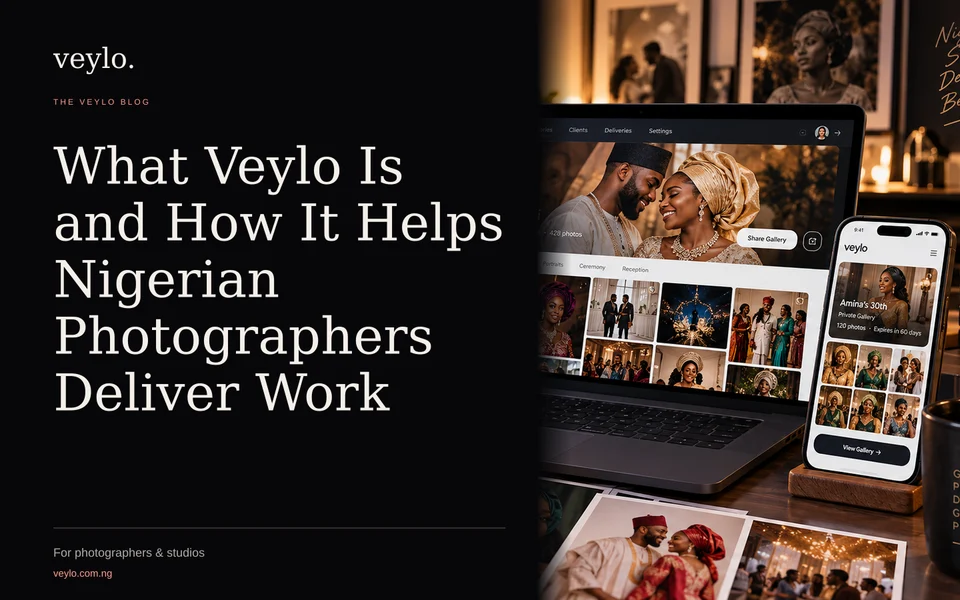
Many Nigerian photographers spend hours after a shoot organizing files, creating folders, and sending links to clients. You might use WhatsApp to send a few highlights, email a zip file, or use a generic gallery service that looks generic and slow. Veylo is a platform built specifically for presenting and delivering finished photographs. It is not an editing tool, nor does it automatically cull your shoot. Its purpose is to take the final images you have chosen and present them in a professional, private link that you can send via WhatsApp or email.
What Veylo Is Not
It is important to clarify what Veylo does not do, as this is a common point of confusion. Veylo does not retouch photographs. It does not cull a large set of raw files down to the best shots. If you have 2,000 raw files from an owambe, you must select and edit the final images yourself using your preferred software. Veylo starts with your finished work. You upload the final JPEG, PNG, or WebP files that you are ready to show to the client.
The Core Workflow
Using Veylo follows a simple, linear process designed to save time after a shoot.
- Create a Delivery: You choose a delivery type. Currently, Veylo offers three main types for photos: Showcase, GridBoard, and Photo Swap. Each serves a different presentation style, which we will cover below.
- Upload Finished Photos: You upload the final edited images. You can upload new files or reuse photos from your Veylo Photo Library if you have previously uploaded them. Files must be JPEG, PNG, or WebP, and each file must be under 20 MB for delivery.
- Review and Customize: You review the captions, order of photos, and design settings. Veylo can suggest captions and layouts, but you approve and edit everything before it goes live. You can also add music or narration for certain formats.
- Publish and Share: You publish the delivery to create a private link. You can add a six-digit PIN and an expiry date for security. You then send this link to your client via WhatsApp, email, or any other channel.
The Three Photo Delivery Types
Choosing the right format is key to how your client receives the work. For detailed comparisons, see Choosing the Right Veylo Delivery Format for Your Nigerian Shoot. Here is a brief overview of the three current photo delivery types:
Showcase Delivery
Showcase starts with a designed presentation. It is ideal for storytelling. You can use formats like Photo Story, which is a paced sequence with captions and music, or Editorial Page, which looks like a scrollable magazine spread. This is great for studio portraits, fashion lookbooks, or traditional weddings where you want to set a mood. It leads the client through the story before showing the full gallery.
GridBoard Delivery
GridBoard opens with the complete photo board. This is the most direct way to show all your work. The client sees every finished photograph on a grid. They can browse freely, open photos for a closer look, and use likes or downloads if you enable them. This is often the best choice for large event coverage like owambe parties, corporate events, or church services where the client expects to see the full volume of work immediately.
Photo Swap Delivery
Photo Swap presents photos as a swipeable stack. The client swipes through one photo at a time, similar to flipping through a physical stack of prints. There are no next or back buttons; the interaction is tactile. At the end, they can view the full gallery. This format is engaging and works well for smaller, curated sets, such as engagement sessions, birthday portraits, or pre-wedding shoots.
Pro Features for Studios and Professionals
Veylo offers a Free plan and a Pro plan. The Free plan allows 3 published deliveries per month with up to 100 photos each. For professional photographers who deliver work regularly, the Pro plan is designed to handle higher volumes and offer more control.
Video Delivery
Pro includes video delivery as a separate delivery type. You can upload finished videos (MP4, MOV, or WebM) up to 5 GB each and 3 hours long. This is useful for delivering highlight reels, ceremony clips, or after-party videos. Video delivery is separate from photo delivery; you cannot mix photos and videos in a single delivery link. You create a specific video delivery, upload the clips, add titles and descriptions, and publish a link for the client to stream. The client does not need an account to view the video. You can control whether they can download the original files.
Photo Library and Editor Handoff
Pro includes a 100 GB Photo Library. This is personal storage for your originals, previews, and returned edits. It is separate from the hosting for published deliveries. This library allows you to organize work into folders by client or session.
A key Pro feature is the Editor Handoff workflow. If you use a retoucher or editor, you can create a password-protected link that allows them to download source files and upload finished edits back to Veylo. You can review their work, accept edits, or request changes. This keeps the workflow within the platform and ensures that accepted edits are saved in your library, ready to be used in a delivery. This is separate from the final client delivery; the editor sees the files for editing, while the client sees the final presentation.
Portfolio
Pro also includes Veylo Portfolio. This is a public page for your selected work. You can curate your best studio portraits, wedding highlights, or lookbook images to showcase your style. You can add a studio introduction, contact details, and social links. Unlike a delivery, a portfolio is a permanent public page (unless you unpublish it) that you can share on your social media or website to attract new clients. Publishing a client delivery does not automatically add it to your portfolio; you must explicitly choose which work to feature there.
Security and Client Access
Client privacy is handled through private links. When you publish a delivery, you get a unique URL. You can protect this with a six-digit PIN. You can also set an expiry date, after which the link stops working. This is useful for time-sensitive projects or if you want to limit how long a client can access the files. You can also control whether clients can download individual photos or the entire collection. For video, you can enable or disable original file downloads per video.
Clients do not need to create an account to view your delivery. They simply open the link in their browser. On a phone, they can view the photos or videos, and if downloads are enabled, they can save the files to their device using the browser’s save prompt or share sheet.
Practical Tips for Nigerian Photographers
- Use WhatsApp for Sharing: Since WhatsApp is the primary communication channel in Nigeria, copying the Veylo link and sending it directly in a chat is the most efficient way to deliver work. You can add a personal message in the chat, and the client can tap the link to view the work immediately.
- Prepare Finished Files: Ensure your final delivery files are optimized. JPEGs under 20 MB are ideal for fast loading on mobile data. If you have large files, consider compressing them before uploading for delivery, while keeping high-resolution originals in your Pro Photo Library or local backup.
- Separate Video and Photos: If you are delivering both photos and videos from an owambe, create two separate deliveries: one for the photo GridBoard or Showcase, and one for the video highlights. This allows you to set different access controls and expiry dates for each.
- Backup Your Originals: Veylo is a delivery and presentation platform. It is not a backup solution. Always keep local backups of your raw files and final edited images.
Getting Started
You can start by exploring the Veylo Product page to see how the workflow functions. If you are ready to create your first delivery, go to the Create page and choose a delivery type. For a live look at how different formats look, you can try the demos for GridBoard or Photo Swap.
Veylo is designed to make the final step of your photography business smooth and professional. It handles the presentation and secure delivery, so you can focus on creating the work and building your client relationships.